

Download Webroot AntiVirus – Fast, Lightweight macOS Protection
Overview
Webroot AntiVirus is a premium, cloud‑driven security solution built especially for macOS by Open Text Corporation. In a world where online threats evolve every minute, having a reliable antivirus tool on your Mac is no longer optional—it’s essential. Webroot distinguishes itself with a lightweight architecture that installs in seconds and runs real‑time scans without slowing down your everyday workflow.
Thanks to its cloud‑based engine, the program constantly receives the latest threat intelligence without the need for bulky signature updates, making it a perfect fit for users who value speed, security, and minimal system impact. Compared with other macOS options such as Avast Mac Security or Antivirus One, Webroot offers flexible subscription plans that let you pick only the features you need, whether you’re protecting a single device or an entire family. A free trial is also available, allowing potential customers to experience the fast, secure protection before committing to a purchase.
The solution works seamlessly on both desktop and mobile platforms, though the mobile experience currently lags behind its desktop counterpart. Overall, Webroot AntiVirus provides a solid foundation of malware defense, web protection, and identity theft safeguards while maintaining a small footprint that respects your Mac’s resources.
Key Features & Benefits
- Cloud‑Based Scanning Engine: Real‑time protection powered by the cloud ensures instant updates against emerging threats without heavy local database downloads.
- Lightning‑Fast Installation: The installer is under 10 MB and typically completes within a minute, making setup virtually painless.
- Low System Footprint: Uses less than 100 MB of RAM during active scans, preserving battery life and performance on both Intel and Apple Silicon Macs.
- Web Shield & Phishing Protection: Blocks malicious websites and fraudulent links before they can compromise your credentials.
- Identity Theft Monitoring: Alerts you if personal information like email addresses or credit card numbers appear in data breaches.
- Customizable Plans: Choose from single‑device, family, or business packages, each with optional add‑ons such as VPN or parental controls.
- Free 30‑Day Trial: Test the full feature set without charge, giving you confidence before purchasing.
- Cross‑Platform Compatibility: While optimized for macOS, Webroot also offers companion apps for Windows, Android, and iOS.
Installation, Setup & Daily Usage
Getting started with Webroot AntiVirus is straightforward. First, visit the official Webroot website and click the Download for macOS button. The installer, a small .dmg file, will download in seconds thanks to the cloud‑based architecture. Open the .dmg and drag the Webroot icon into your Applications folder. During the first launch, you’ll be prompted to create a Webroot account—this serves as your license key and enables cloud sync across devices.
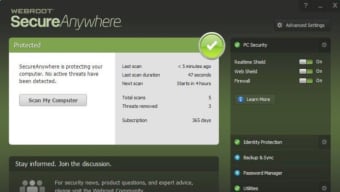
After signing in, the application runs an initial quick scan that typically completes in under two minutes. Because the heavy lifting happens in the cloud, the scan consumes minimal CPU and RAM, allowing you to continue working, streaming, or gaming without noticeable slowdown. The dashboard presents a clean, though slightly dated, interface that displays overall protection status, recent threats blocked, and any pending updates. Real‑time protection is enabled by default, continuously monitoring file activity, web traffic, and email attachments.
Daily usage requires almost no interaction. If a threat is detected, Webroot pops a notification with a brief description and recommended action (quarantine, delete, or ignore). For deeper control, the Settings menu lets you schedule full system scans, adjust firewall rules, and manage exclusions for trusted applications. The free trial includes all premium features, so you can explore advanced options such as identity monitoring and VPN without restriction. Should you decide to upgrade, the transition from trial to paid subscription is seamless—your license is simply upgraded in the account portal, and the app continues to protect your Mac without interruption.
Compatibility, Pros & Cons
Webroot AntiVirus is officially compatible with macOS 10.14 (Mojave) and later, including macOS 13 Ventura and the latest Apple Silicon (M1/M2) machines. While the core engine runs natively on both Intel and ARM architectures, the companion mobile apps for Android and iOS are separate downloads and have limited feature parity compared to the desktop version.
Pros
- Extremely fast installation and minimal system impact.
- Cloud‑based updates keep protection current without large downloads.
- Flexible subscription plans with a generous free trial.
- Comprehensive web shield and identity theft alerts.
- Cross‑platform coverage for Windows, Android, and iOS.
Cons
- Outdated UI design that doesn’t fully blend with modern macOS aesthetics.
- Mobile apps lack several advanced features found on the desktop version.
- No built‑in VPN in the macOS package; it must be purchased as an add‑on.
- Limited customization for power users who prefer granular control over scan settings.
- Customer support response times can be slower during peak periods.
Frequently Asked Questions
Is Webroot AntiVirus truly free for Mac users?
Webroot offers a 30‑day free trial that provides full access to all premium features. After the trial expires, you’ll need to purchase a subscription to continue receiving protection.
How does the cloud‑based engine affect my privacy?
Webroot processes only anonymized metadata in the cloud to identify threats. No personal files are uploaded, and the company adheres to strict privacy policies and GDPR compliance.
Can I run Webroot alongside another antivirus?
While technically possible, running two real‑time scanners simultaneously can cause conflicts and performance issues. It’s recommended to use Webroot as your sole protection suite.
Does Webroot protect against ransomware?
Yes. Webroot includes ransomware detection that monitors suspicious file encryption behavior and blocks it before damage occurs.
What happens if I switch from Windows to macOS?
Your Webroot account is cross‑platform. You can log in on a Mac, download the macOS version, and your subscription will continue without additional fees.
Conclusion & Call to Action
In the crowded field of macOS security tools, Webroot AntiVirus stands out for its speed, cloud‑driven intelligence, and low resource consumption. It delivers the core protections you need—malware detection, web shield, and identity monitoring—while offering flexible plans that adapt to personal or family usage. The trade‑offs are mainly aesthetic, with an interface that feels a generation behind, and a mobile suite that still needs feature enrichment. If you prioritize a quick, unobtrusive solution that won’t hog RAM or CPU, Webroot is a compelling choice. Take advantage of the 30‑day free trial to see how the lightweight engine performs on your Mac, and decide if the premium features align with your security goals.
Ready to safeguard your Mac with a fast, cloud‑based antivirus? Download Webroot AntiVirus today and enjoy peace of mind without sacrificing performance.
Pros: Fast installation, low system impact, strong web shield, flexible plans.
Cons: Outdated UI, limited mobile features, no built‑in VPN.







